> ## Documentation Index
> Fetch the complete documentation index at: https://docs.kombify.io/llms.txt
> Use this file to discover all available pages before exploring further.

# انسخ صور هاتفك احتياطيًا

> اربط هاتفك بخادم صورك، من أول تشغيل للتطبيق حتى رفع أول صورة.

export const PhotoGuideSummary = ({children, ...props}) => {
  const Tag = "summary";
  return <Tag {...props}>{children}</Tag>;
};

export const PhotoGuideStrong = ({children, ...props}) => {
  const Tag = "strong";
  return <Tag {...props}>{children}</Tag>;
};

export const PhotoGuideFooter = ({children, ...props}) => {
  const Tag = "footer";
  return <Tag {...props}>{children}</Tag>;
};

export const PhotoGuideFigure = ({children, ...props}) => {
  const Tag = "figure";
  return <Tag {...props}>{children}</Tag>;
};

export const PhotoGuideFigcaption = ({children, ...props}) => {
  const Tag = "figcaption";
  return <Tag {...props}>{children}</Tag>;
};

export const PhotoGuideDialog = ({children, ...props}) => {
  const Tag = "dialog";
  return <Tag {...props}>{children}</Tag>;
};

export const PhotoGuideDetails = ({children, ...props}) => {
  const Tag = "details";
  return <Tag {...props}>{children}</Tag>;
};

export const PhotoGuideAside = ({children, ...props}) => {
  const Tag = "aside";
  return <Tag {...props}>{children}</Tag>;
};

export const PhotoGuideArticle = ({children, ...props}) => {
  const Tag = "article";
  return <Tag {...props}>{children}</Tag>;
};

export const PhotoGuideIcon = ({name}) => {
  const icons = {
    icon0: <svg aria-hidden="true" className="ico" fill="none" stroke="currentColor" strokeLinecap="round" strokeLinejoin="round" strokeWidth="1.7" viewBox="0 0 24 24"><rect height="20" rx="3" width="12" x="6" y="2"></rect><path d="M10 5h4M11 19h2"></path></svg>,
    icon1: <svg aria-hidden="true" className="ico" fill="none" stroke="currentColor" strokeLinecap="round" strokeLinejoin="round" strokeWidth="1.7" viewBox="0 0 24 24"><rect height="7" rx="1.5" width="7" x="3" y="3"></rect><rect height="7" rx="1.5" width="7" x="14" y="3"></rect><rect height="7" rx="1.5" width="7" x="3" y="14"></rect><rect height="7" rx="1.5" width="7" x="14" y="14"></rect></svg>,
    icon2: <svg aria-hidden="true" className="ico" fill="none" stroke="currentColor" strokeLinecap="round" strokeLinejoin="round" strokeWidth="1.7" viewBox="0 0 24 24"><path d="M12 5v15M3 4c4-1 6 0 9 1 3-1 5-2 9-1v15c-4-1-6 0-9 1-3-1-5-2-9-1Z"></path></svg>,
    icon3: <svg aria-hidden="true" className="ico" fill="none" stroke="currentColor" strokeLinecap="round" strokeLinejoin="round" strokeWidth="1.7" viewBox="0 0 24 24"><path d="M6 8V3h12v5M6 17H3V8h18v9h-3M6 14h12v7H6Z"></path><path d="M17 11h.01"></path></svg>,
    icon4: <svg aria-hidden="true" className="ico" fill="none" stroke="currentColor" strokeLinecap="round" strokeLinejoin="round" strokeWidth="1.7" viewBox="0 0 24 24"><path d="m5 12 4 4L19 6"></path></svg>,
    icon5: <svg aria-hidden="true" className="ico" fill="none" stroke="currentColor" strokeLinecap="round" strokeLinejoin="round" strokeWidth="1.7" viewBox="0 0 24 24"><path d="M5 12h14M13 6l6 6-6 6"></path></svg>,
    icon6: <svg aria-hidden="true" className="ico" fill="none" stroke="currentColor" strokeLinecap="round" strokeLinejoin="round" strokeWidth="1.7" viewBox="0 0 24 24"><path d="M14 4h6v6m0-6L10 14"></path><path d="M10 4H5a1 1 0 0 0-1 1v14a1 1 0 0 0 1 1h14a1 1 0 0 0 1-1v-5"></path></svg>,
    icon7: <svg aria-hidden="true" className="ico" fill="none" stroke="currentColor" strokeLinecap="round" strokeLinejoin="round" strokeWidth="1.7" viewBox="0 0 24 24"><path d="M16.7 1.8c0 2.1-1.7 4.4-3.7 4.2-.4-2.1 1.8-4.3 3.7-4.2ZM20.4 17.3c-.5 1.2-.8 1.7-1.5 2.7-1 1.5-2.4 3.3-4.2 3.3-1.6 0-2-1-4.1-.9-2.1 0-2.5 1-4.2.9-1.8-.1-3.1-1.7-4.1-3.2C-.5 15.9-.7 10.4 1 7.6c1.2-2 3.1-3.1 4.9-3.1 1.9 0 3.1 1 4.7 1 1.5 0 2.5-1 4.7-1 1.6 0 3.3.9 4.5 2.3-4 2.2-3.3 8 0 10.5Z" fill="currentColor" stroke="none" transform="translate(2 0) scale(.87)"></path></svg>,
    icon8: <svg aria-hidden="true" className="ico" fill="none" stroke="currentColor" strokeLinecap="round" strokeLinejoin="round" strokeWidth="1.7" viewBox="0 0 24 24"><path d="M5 12a7 7 0 0 1 14 0v6H5Zm2-6L5 3m12 3 2-3M2 12v5m20-5v5M8 18v4m8-4v4"></path><path d="M8.5 9h.01M15.5 9h.01"></path></svg>,
    icon9: <svg aria-hidden="true" className="ico" fill="none" stroke="currentColor" strokeLinecap="round" strokeLinejoin="round" strokeWidth="1.7" viewBox="0 0 24 24"><rect height="7" rx="2" width="18" x="3" y="3"></rect><rect height="7" rx="2" width="18" x="3" y="14"></rect><path d="M7 6.5h.01M7 17.5h.01M16 6.5h2M16 17.5h2"></path></svg>,
    icon10: <svg aria-hidden="true" className="ico" fill="none" stroke="currentColor" strokeLinecap="round" strokeLinejoin="round" strokeWidth="1.7" viewBox="0 0 24 24"><circle cx="12" cy="12" r="9"></circle><path d="M12 11v5M12 7h.01"></path></svg>,
    icon11: <svg aria-hidden="true" className="ico" fill="none" stroke="currentColor" strokeLinecap="round" strokeLinejoin="round" strokeWidth="1.7" viewBox="0 0 24 24"><circle cx="12" cy="12" r="9"></circle><path d="m8 12 3 3 5-6"></path></svg>,
    icon12: <svg aria-hidden="true" className="ico" fill="none" stroke="currentColor" strokeLinecap="round" strokeLinejoin="round" strokeWidth="1.7" viewBox="0 0 24 24"><path d="M3 7h4l2-3h6l2 3h4v13H3Z"></path><circle cx="12" cy="13" r="4"></circle></svg>,
    icon13: <svg aria-hidden="true" className="ico" fill="none" stroke="currentColor" strokeLinecap="round" strokeLinejoin="round" strokeWidth="1.7" viewBox="0 0 24 24"><circle cx="10.5" cy="10.5" r="6.5"></circle><path d="m16 16 5 5M7 10.5h7M10.5 7v7"></path></svg>,
    icon14: <svg aria-hidden="true" className="ico" fill="none" stroke="currentColor" strokeLinecap="round" strokeLinejoin="round" strokeWidth="1.7" viewBox="0 0 24 24"><path d="M2 8a16 16 0 0 1 20 0M5 12a11 11 0 0 1 14 0M8.5 16a5 5 0 0 1 7 0M12 20h.01"></path></svg>,
    icon15: <svg aria-hidden="true" className="ico" fill="none" stroke="currentColor" strokeLinecap="round" strokeLinejoin="round" strokeWidth="1.7" viewBox="0 0 24 24"><rect height="14" rx="2" width="20" x="2" y="3"></rect><path d="M8 22h8M12 17v5"></path></svg>,
    icon16: <svg aria-hidden="true" className="ico" fill="none" stroke="currentColor" strokeLinecap="round" strokeLinejoin="round" strokeWidth="1.7" viewBox="0 0 24 24"><path d="m15 5-7 7 7 7"></path></svg>,
    icon17: <svg aria-hidden="true" className="ico" fill="none" stroke="currentColor" strokeLinecap="round" strokeLinejoin="round" strokeWidth="1.7" viewBox="0 0 24 24"><path d="M12 3 3 7v6c0 5 9 9 9 9s9-4 9-9V7Z"></path><path d="m8 12 3 3 5-6"></path></svg>,
    icon18: <svg aria-hidden="true" className="ico" fill="none" stroke="currentColor" strokeLinecap="round" strokeLinejoin="round" strokeWidth="1.7" viewBox="0 0 24 24"><path d="m12 3 2.8 6.2L21 12l-6.2 2.8L12 21l-2.8-6.2L3 12l6.2-2.8Z"></path></svg>,
    icon19: <svg aria-hidden="true" className="ico" fill="none" stroke="currentColor" strokeLinecap="round" strokeLinejoin="round" strokeWidth="1.7" viewBox="0 0 24 24"><path d="m6 6 12 12M6 18 18 6"></path></svg>
  };
  return icons[name] || null;
};

export const PhotoGuide = ({children}) => {
  const rootRef = useRef(null);
  useEffect(() => {
    const root = rootRef.current;
    if (!root) return;
    const $ = (selector, scope = root) => scope.querySelector(selector);
    const $$ = (selector, scope = root) => Array.from(scope.querySelectorAll(selector));
    const byId = id => $('[id="' + id + '"]');
    const abort = new AbortController();
    const listen = (node, event, handler) => node && node.addEventListener(event, handler, {
      signal: abort.signal
    });
    const storageKey = 'kombify-photo-guide-v3';
    let current = 0;
    let completed = [false, false, false, false];
    let verified = [false, false, false];
    let toastTimer;
    try {
      const saved = JSON.parse(localStorage.getItem(storageKey) || 'null');
      if (Array.isArray(saved?.completed) && saved.completed.length === 4) completed = saved.completed.map(Boolean);
      if (Array.isArray(saved?.verified) && saved.verified.length === 3) verified = saved.verified.map(Boolean);
    } catch (_) {}
    if (!verified.every(Boolean)) completed[3] = false;
    const save = () => {
      try {
        localStorage.setItem(storageKey, JSON.stringify({
          completed,
          verified
        }));
      } catch (_) {}
    };
    const toast = text => {
      const node = $('#kpg-toast');
      node.textContent = text;
      node.hidden = false;
      clearTimeout(toastTimer);
      toastTimer = setTimeout(() => {
        node.hidden = true;
      }, 3800);
    };
    const updateProgress = () => {
      $('#kpg-progress-label').textContent = `اكتملت ${completed.filter(Boolean).length} من 4 خطوات`;
      $$('.progress-meter span').forEach((node, i) => node.classList.toggle('done', completed[i]));
      $$('.step-tab').forEach((node, i) => {
        node.classList.toggle('done', completed[i]);
        $('.step-dot', node).textContent = completed[i] ? '✓' : String(i + 1);
      });
      $('#kpg-done-message').hidden = !completed[3];
    };
    const selectStep = (index, focus = false) => {
      current = Math.max(0, Math.min(3, index));
      $$('.step-tab').forEach((node, i) => {
        node.setAttribute('aria-selected', String(i === current));
        node.tabIndex = i === current ? 0 : -1;
      });
      $$('.guide-panel').forEach((node, i) => {
        node.hidden = i !== current;
      });
      $('#kpg-prev').disabled = current === 0;
      $('#kpg-next span').textContent = current === 3 ? completed[3] ? 'مواضيع أخرى' : 'إنهاء الفحص' : 'تم · التالي';
      if (focus) $('[data-step="' + current + '"]').focus();
    };
    $$('[data-step]').forEach(node => listen(node, 'click', () => selectStep(Number(node.dataset.step))));
    listen($('.step-tabs'), 'keydown', event => {
      if (!['ArrowRight', 'ArrowLeft', 'Home', 'End'].includes(event.key)) return;
      event.preventDefault();
      selectStep(event.key === 'Home' ? 0 : event.key === 'End' ? 3 : (current + (event.key === 'ArrowRight' ? 1 : 3)) % 4, true);
    });
    listen($('#kpg-prev'), 'click', () => selectStep(current - 1));
    listen($('#kpg-next'), 'click', () => {
      if (current < 3) {
        completed[current] = true;
        save();
        updateProgress();
        selectStep(current + 1, true);
      } else if (completed[3]) {
        $('#kpg-more').scrollIntoView({
          block: 'start'
        });
        $('.more-card').focus({
          preventScroll: true
        });
      } else if (verified.every(Boolean)) {
        completed[3] = true;
        save();
        updateProgress();
        selectStep(3);
        toast('تم تعليم فحصك كمكتمل في هذا المتصفح.');
      } else {
        toast('افحص النقاط الثلاث على خادم صورك أولاً.');
        $('#kpg-verify-' + verified.indexOf(false)).focus();
      }
    });
    $$('.verify-list input').forEach((node, i) => {
      node.checked = verified[i];
      listen(node, 'change', () => {
        verified[i] = node.checked;
        if (!verified.every(Boolean)) completed[3] = false;
        save();
        updateProgress();
        selectStep(current);
      });
    });
    listen($('#kpg-reset-progress'), 'click', () => {
      completed = [false, false, false, false];
      verified = [false, false, false];
      $$('.verify-list input').forEach(node => {
        node.checked = false;
      });
      save();
      updateProgress();
      selectStep(0);
      toast('تمت إعادة ضبط تقدمك في هذا المتصفح.');
    });
    listen($('#kpg-print'), 'click', () => window.print());
    const openDialog = id => {
      const dialog = byId(id);
      if (dialog && !dialog.open) dialog.showModal();
    };
    $$('[data-open]').forEach(node => listen(node, 'click', event => {
      event.preventDefault();
      openDialog(node.dataset.open);
    }));
    $$('[data-close]').forEach(node => listen(node, 'click', () => node.closest('dialog').close()));
    $$('dialog').forEach(dialog => listen(dialog, 'click', event => {
      if (event.target !== dialog) return;
      const rect = dialog.getBoundingClientRect();
      if (event.clientX < rect.left || event.clientX > rect.right || event.clientY < rect.top || event.clientY > rect.bottom) dialog.close();
    }));
    $$('[data-zoom]').forEach(node => listen(node, 'click', () => {
      const image = $('img', node.closest('figure'));
      $('#kpg-zoom-image').src = image.currentSrc || image.src;
      $('#kpg-zoom-image').alt = image.alt;
      $('#kpg-zoom-source').href = image.src;
      openDialog('kpg-zoom-dialog');
    }));
    $$('[data-reveal]').forEach(node => listen(node, 'click', () => {
      const details = byId(node.dataset.reveal);
      if (details) details.open = true;
    }));
    const checkImage = image => image.closest('.screen-figure').classList.toggle('image-unavailable', !image.complete || !image.naturalWidth);
    $$('.screen-image > img').forEach(image => {
      listen(image, 'load', () => checkImage(image));
      listen(image, 'error', () => checkImage(image));
      if (image.complete) checkImage(image);
    });
    const imageTimer = setTimeout(() => $$('.screen-image > img').forEach(checkImage), 7000);
    updateProgress();
    selectStep(0);
    return () => {
      abort.abort();
      clearTimeout(toastTimer);
      clearTimeout(imageTimer);
      $$('dialog[open]').forEach(dialog => dialog.close());
    };
  }, []);
  return <div className="kombify-photo-guide not-prose" lang="ar" dir="rtl" ref={rootRef}>{children}</div>;
};

<PhotoGuide>
  <div className="guide-content" id="kpg-photo-guide-content">
    <div className="page-top">
      <div>
        <div className="intro-meta"><span><PhotoGuideIcon name="icon0" /> iPhone وiPad وAndroid</span><span><PhotoGuideIcon name="icon1" /> 4 خطوات قصيرة</span><span><PhotoGuideIcon name="icon2" /> لا حاجة إلى معرفة مسبقة</span></div>
      </div>

      <div className="page-tools">
        <button aria-label="اطبع الدليل" className="tool-button" id="kpg-print" type="button">
          <PhotoGuideIcon name="icon3" />
        </button>
      </div>
    </div>

    <div className="ready-strip"><strong>ما تحتاج إليه</strong><span><PhotoGuideIcon name="icon4" /> خادم Immich قيد التشغيل</span><span><PhotoGuideIcon name="icon4" /> عنوان خادم صورك وحسابك عليه</span><a data-reveal="kpg-no-server" href="#kpg-help">لم تُعدّه بعد؟ <PhotoGuideIcon name="icon5" /></a></div>

    <section aria-labelledby="kpg-apps-title" className="downloads" id="kpg-apps">
      <div className="section-top">
        <h2 id="kpg-apps-title">ابدأ بتنزيل التطبيق المناسب.</h2><a className="small-link" href="https://immich.app" rel="noopener noreferrer" target="_blank">مباشرةً من Immich <PhotoGuideIcon name="icon6" /></a>
      </div>

      <div className="downloads-grid"><a className="download-card active" href="https://apps.apple.com/app/immich/id1613945652" rel="noopener noreferrer" target="_blank"><span className="platform-icon"><PhotoGuideIcon name="icon7" /></span><span className="download-text"><strong>iPhone وiPad</strong><small>Immich لنظام iOS</small><span className="store-name">افتح في App Store <PhotoGuideIcon name="icon6" /></span></span></a><a className="download-card" href="https://play.google.com/store/apps/details?id=app.alextran.immich" rel="noopener noreferrer" target="_blank"><span className="platform-icon"><PhotoGuideIcon name="icon8" /></span><span className="download-text"><strong>Android</strong><small>Immich لنظام Android</small><span className="store-name">افتح في Google Play <PhotoGuideIcon name="icon6" /></span></span></a><a className="download-card" href="https://docs.immich.app/install/docker-compose/" rel="noopener noreferrer" target="_blank"><span className="platform-icon"><PhotoGuideIcon name="icon9" /></span><span className="download-text"><strong>ليس لديك خادم صور بعد؟</strong><small>لمن يشغّل الخادم</small><span className="store-name">إعداد خادم <PhotoGuideIcon name="icon6" /></span></span></a></div>
      <p className="download-hint">تستخدم الخطوات أدناه iPhone أو iPad. <a className="" href="https://docs.immich.app/features/mobile-backup/#android" rel="noopener noreferrer" target="_blank">ملاحظات لنظام Android <PhotoGuideIcon name="icon6" /></a> · التطبيق وحده لا يغني عن الخادم.</p>
    </section>

    <section aria-labelledby="kpg-guide-title" className="guide-section" id="kpg-guide">
      <div className="guide-heading">
        <h2 id="kpg-guide-title">اتصل خطوة بخطوة.</h2><span className="platform-label"><PhotoGuideIcon name="icon7" /> iPhone / iPad</span>
      </div>

      <div className="wizard">
        <div aria-label="خطوات الإعداد" className="step-tabs" role="tablist"><button aria-controls="kpg-panel-0" aria-selected="true" className="step-tab" data-step="0" id="kpg-tab-0" role="tab" tabIndex="0" type="button"><span className="step-dot">1</span><span>الاتصال</span></button><button aria-controls="kpg-panel-1" aria-selected="false" className="step-tab" data-step="1" id="kpg-tab-1" role="tab" tabIndex="-1" type="button"><span className="step-dot">2</span><span>اختيار الألبومات</span></button><button aria-controls="kpg-panel-2" aria-selected="false" className="step-tab" data-step="2" id="kpg-tab-2" role="tab" tabIndex="-1" type="button"><span className="step-dot">3</span><span>بدء الرفع</span></button><button aria-controls="kpg-panel-3" aria-selected="false" className="step-tab" data-step="3" id="kpg-tab-3" role="tab" tabIndex="-1" type="button"><span className="step-dot">4</span><span>الفحص</span></button></div>

        <PhotoGuideArticle aria-labelledby="kpg-tab-0" className="guide-panel" id="kpg-panel-0" role="tabpanel">
          <div className="panel-copy">
            <div className="step-kicker">الخطوة 01 / 04</div>
            <h3>أدخل<br />عنوان صورك.</h3>
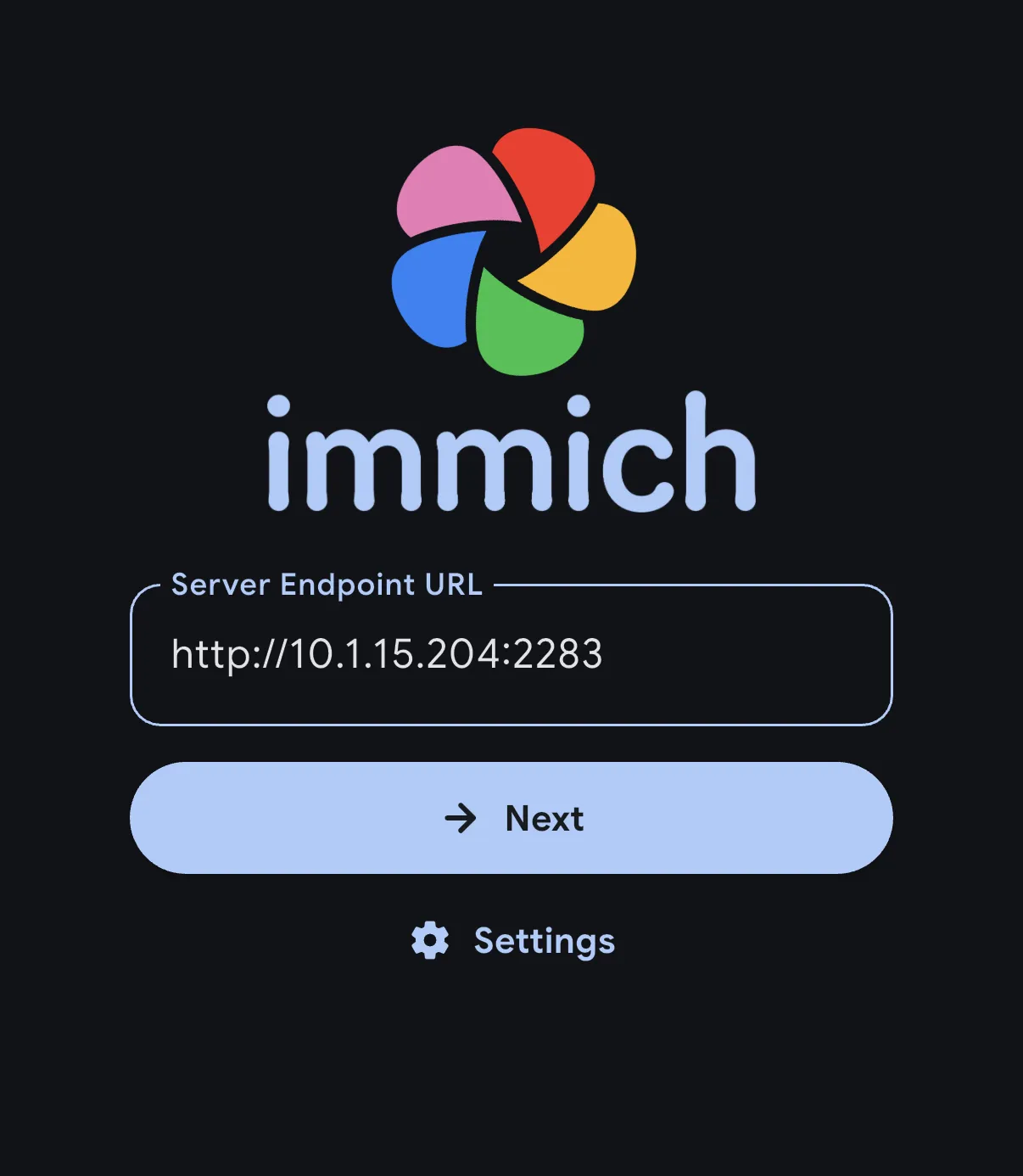
            <p className="step-intro">افتح تطبيق Immich. يسألك أولًا عن الخادم الذي تريد الاتصال به.</p>
            <ol className="click-list"><li><span className="click-num">1</span><span>أدخل عنوان Immich الخاص بك في <span className="key">Server Endpoint URL</span>.</span></li><li><span className="click-num">2</span><span>اضغط <span className="key">Next</span> وسجّل الدخول بـ<strong>حساب Immich</strong> الخاص بك.</span></li></ol>
            <div className="micro-note"><PhotoGuideIcon name="icon10" /><span>العنوان في الصورة مجرد مثال. استخدم العنوان الذي تفتح به خادم صورك في المتصفح.</span></div>

            <PhotoGuideDetails>
              <PhotoGuideSummary>من أين أحصل على العنوان والحساب؟</PhotoGuideSummary>
              <p>من الشخص الذي أعدّ خادم صورك. إذا كان إعداد kombify يشغّله بالفعل، فافتح خدمة الصور من Node Hub. حساب Immich ليس تلقائيًا حسابك في kombify.</p>
            </PhotoGuideDetails>

            <div className="step-check"><PhotoGuideIcon name="icon11" /> بعد ذلك ترى نظرة عامة على صورك.</div>
          </div>

          <div className="panel-visual">
            <span className="screenshot-tag"><PhotoGuideIcon name="icon12" /> لقطة شاشة من المطوّر</span>

            <PhotoGuideFigure className="screen-figure" data-asset="login">
              <div className="screen-image"><img alt="أول تشغيل للتطبيق" decoding="async" height="1000" referrerPolicy="no-referrer" src="https://docs.immich.app/assets/images/sign-in-phone-92be8a8eab0f72d121e8b62e6f69df17.webp" width="870" /><span className="annotation login-url" data-n="1" /><span className="annotation login-next" data-n="2" /><a className="image-fallback" href="https://docs.immich.app/assets/images/sign-in-phone-92be8a8eab0f72d121e8b62e6f69df17.webp" rel="noopener noreferrer" target="_blank"><PhotoGuideIcon name="icon6" /> افتح لقطة الشاشة من المطوّر<span>يتطلب تحميلها اتصالاً بالإنترنت.</span></a><button aria-label="تكبير لقطة الشاشة: أول تشغيل للتطبيق" className="zoom-button" data-zoom="login" type="button"><PhotoGuideIcon name="icon13" /></button></div><PhotoGuideFigcaption>أول تشغيل للتطبيق · <a className="" href="https://docs.immich.app/features/mobile-app/" rel="noopener noreferrer" target="_blank">Immich <PhotoGuideIcon name="icon6" /></a></PhotoGuideFigcaption>
            </PhotoGuideFigure>
          </div>
        </PhotoGuideArticle>

        <PhotoGuideArticle aria-labelledby="kpg-tab-1" className="guide-panel" hidden={true} id="kpg-panel-1" role="tabpanel">
          <div className="panel-copy">
            <div className="step-kicker">الخطوة 02 / 04</div>
            <h3>اختر الصور<br />التي ستُرفع.</h3>
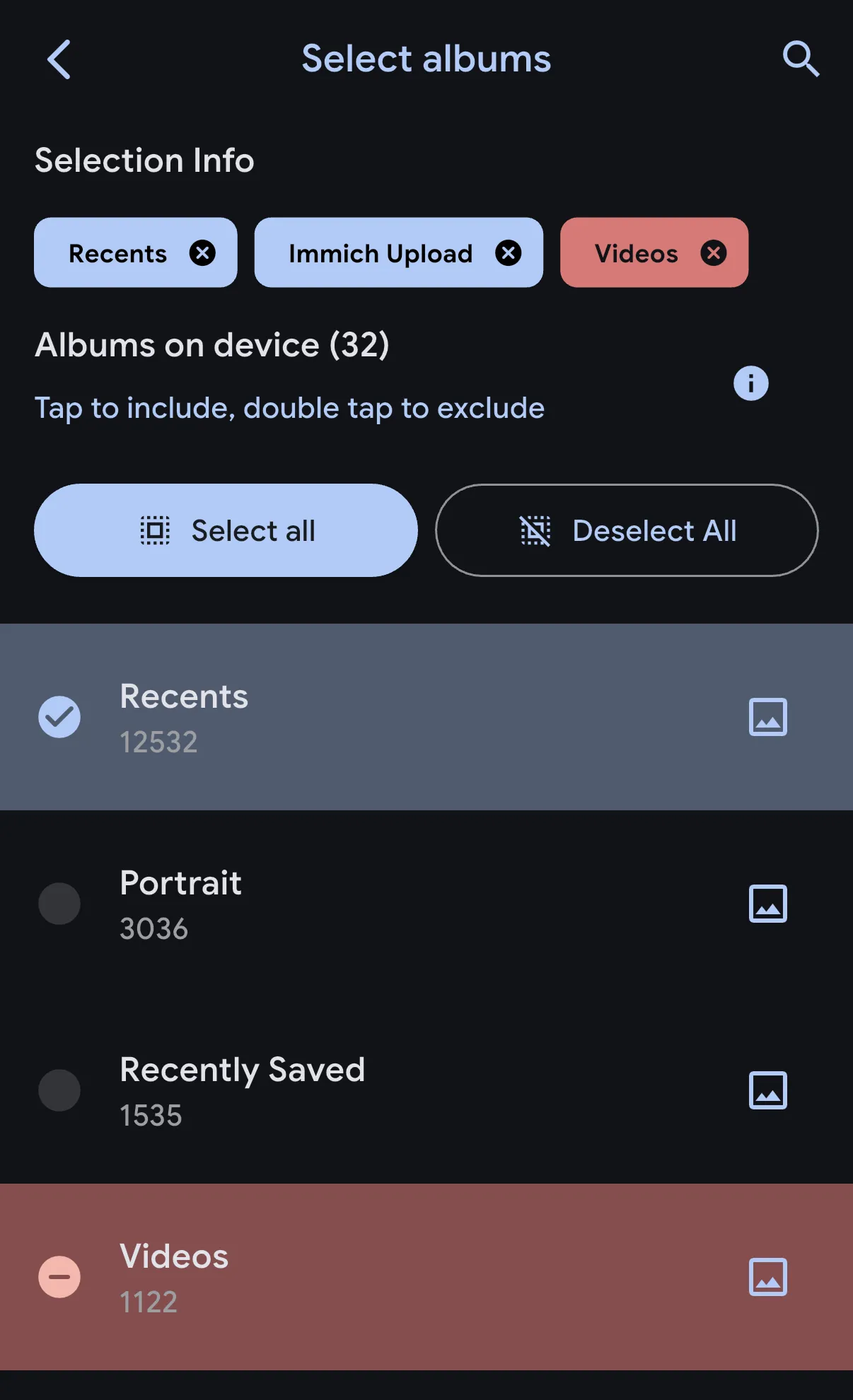
            <p className="step-intro">للتجربة الأولى يكفي ألبوم صغير فيه صورة واحدة لا تمانع في رفعها.</p>
            <ol className="click-list"><li><span className="click-num">1</span><span>افتح <strong>أيقونة السحابة</strong> في أعلى اليمين. تحت <span className="key">Backup Albums</span>، اضغط <span className="key">Select</span>.</span></li><li><span className="click-num">2</span><span>حدّد ألبوم التجربة. تُظهر الصورة <span className="key">Recents</span> كمثال.</span></li><li><span className="click-num">3</span><span>استخدم سهم الرجوع للعودة إلى شاشة النسخ الاحتياطي.</span></li></ol>
            <div className="micro-note"><PhotoGuideIcon name="icon10" /><span>اسمح للتطبيق بالوصول إلى الصور التي تريدها. مع الوصول المحدود إلى الصور، لا يرى التطبيق إلا الصور التي شاركتها معه.</span></div>

            <PhotoGuideDetails>
              <PhotoGuideSummary>هل أضمّن كل الصور الجديدة لاحقًا؟</PhotoGuideSummary>
              <p>حدّد الألبوم الذي تُحفظ فيه صورك الجديدة. تحقق من حجمه قبل تشغيل الرفع. الألبوم الكبير يستغرق وقتًا أطول.</p>
            </PhotoGuideDetails>

            <div className="step-check"><PhotoGuideIcon name="icon11" /> تعرض شاشة النسخ الاحتياطي الألبوم الذي حددته.</div>
          </div>

          <div className="panel-visual">
            <span className="screenshot-tag"><PhotoGuideIcon name="icon12" /> لقطة شاشة من المطوّر</span>

            <PhotoGuideFigure className="screen-figure portrait" data-asset="albums">
              <div className="screen-image"><img alt="اختيار ألبوم" decoding="async" height="1000" referrerPolicy="no-referrer" src="https://docs.immich.app/assets/images/backup-album-selection-198b47e0b562cb00dcc5fbf0280bf6da.webp" width="609" /><span className="annotation album-mark" data-n="2" /><a className="image-fallback" href="https://docs.immich.app/assets/images/backup-album-selection-198b47e0b562cb00dcc5fbf0280bf6da.webp" rel="noopener noreferrer" target="_blank"><PhotoGuideIcon name="icon6" /> افتح لقطة الشاشة من المطوّر<span>يتطلب تحميلها اتصالاً بالإنترنت.</span></a><button aria-label="تكبير لقطة الشاشة: اختيار ألبوم" className="zoom-button" data-zoom="albums" type="button"><PhotoGuideIcon name="icon13" /></button></div><PhotoGuideFigcaption>اختيار ألبوم · <a className="" href="https://docs.immich.app/features/mobile-app/" rel="noopener noreferrer" target="_blank">Immich <PhotoGuideIcon name="icon6" /></a></PhotoGuideFigcaption>
            </PhotoGuideFigure>
          </div>
        </PhotoGuideArticle>

        <PhotoGuideArticle aria-labelledby="kpg-tab-2" className="guide-panel" hidden={true} id="kpg-panel-2" role="tabpanel">
          <div className="panel-copy">
            <div className="step-kicker">الخطوة 03 / 04</div>
            <h3>شغّل<br />الرفع.</h3>
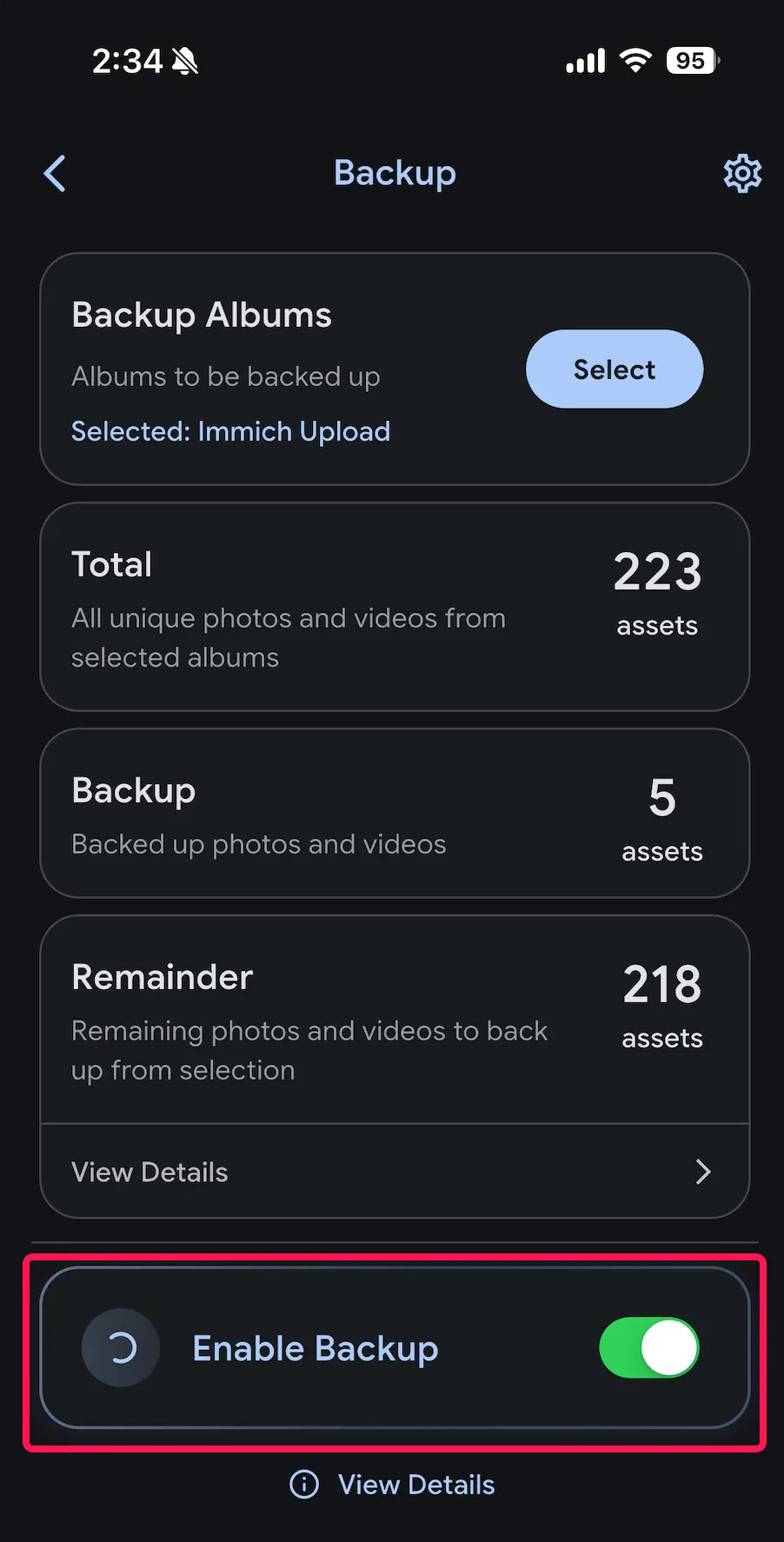
            <p className="step-intro">ابقَ على شبكة Wi-Fi أثناء الرفع الأول وأبقِ التطبيق مفتوحًا.</p>
            <ol className="click-list"><li><span className="click-num">1</span><span>مرّر للأسفل في شاشة النسخ الاحتياطي.</span></li><li><span className="click-num">2</span><span>شغّل <span className="key">Enable Backup</span>. يرفع التطبيق ملفات الألبوم الذي حددته.</span></li><li><span className="click-num">3</span><span>تابع التقدم تحت <span className="key">Remainder</span>، وهو يعدّ الملفات التي لم تُرفع بعد.</span></li></ol>
            <div className="micro-note"><PhotoGuideIcon name="icon14" /><span>افتراضيًا يرفع Immich عبر Wi-Fi فقط. تحتوي أيقونة الترس في إعدادات النسخ الاحتياطي على خيارات بيانات الجوال.</span></div>

            <PhotoGuideDetails>
              <PhotoGuideSummary>هل يمكن الرفع والتطبيق مغلق؟</PhotoGuideSummary>
              <p>شغّل تحديث التطبيقات في الخلفية لـ Immich في iOS. يقرر iOS متى يُسمح للتطبيق بالعمل في الخلفية، لذا لا يُضمن الرفع الفوري. <a data-reveal="kpg-background" href="#kpg-help">شاهد الخطوات</a>.</p>
            </PhotoGuideDetails>

            <div className="step-check"><PhotoGuideIcon name="icon11" /> لم يتبقَّ شيء للرفع في ألبوم التجربة.</div>
          </div>

          <div className="panel-visual">
            <span className="screenshot-tag"><PhotoGuideIcon name="icon12" /> لقطة شاشة من المطوّر</span>

            <PhotoGuideFigure className="screen-figure tall" data-asset="enable">
              <div className="screen-image"><img alt="تفعيل النسخ الاحتياطي" decoding="async" height="1000" referrerPolicy="no-referrer" src="https://docs.immich.app/assets/images/enable-backup-button-590dec9774e09ecc6ec6f1ddeda37a3c.webp" width="508" /><span className="annotation enable-mark" data-n="2" /><a className="image-fallback" href="https://docs.immich.app/assets/images/enable-backup-button-590dec9774e09ecc6ec6f1ddeda37a3c.webp" rel="noopener noreferrer" target="_blank"><PhotoGuideIcon name="icon6" /> افتح لقطة الشاشة من المطوّر<span>يتطلب تحميلها اتصالاً بالإنترنت.</span></a><button aria-label="تكبير لقطة الشاشة: تفعيل النسخ الاحتياطي" className="zoom-button" data-zoom="enable" type="button"><PhotoGuideIcon name="icon13" /></button></div><PhotoGuideFigcaption>تفعيل النسخ الاحتياطي · <a className="" href="https://docs.immich.app/features/mobile-app/" rel="noopener noreferrer" target="_blank">Immich <PhotoGuideIcon name="icon6" /></a></PhotoGuideFigcaption>
            </PhotoGuideFigure>
          </div>
        </PhotoGuideArticle>

        <PhotoGuideArticle aria-labelledby="kpg-tab-3" className="guide-panel" hidden={true} id="kpg-panel-3" role="tabpanel">
          <div className="panel-copy">
            <div className="step-kicker">الخطوة 04 / 04</div>
            <h3>هل وصلت صورتك<br />فعلًا؟</h3>
            <p className="step-intro">افتح عنوان Immich الخاص بك في متصفح على جهاز ثانٍ وسجّل الدخول بالحساب نفسه.</p>
            <div className="verify-list"><label><input id="kpg-verify-0" type="checkbox" /><span>أرى صورة التجربة في النظرة العامة على الصور.</span></label><label><input id="kpg-verify-1" type="checkbox" /><span>تُفتح الصورة في العرض الكامل.</span></label><label><input id="kpg-verify-2" type="checkbox" /><span>لا يعرض التطبيق أي عناصر متبقية للرفع في ألبوم التجربة.</span></label></div>
            <div className="done-message" hidden={true} id="kpg-done-message">حُفظ تأكيدك. تم فحص أول عملية رفع لك.</div>
            <div className="micro-note"><PhotoGuideIcon name="icon10" /><span>ضع علامة فقط على ما فحصته بنفسك. لا يقرأ هذا الدليل خادم صورك.</span></div>
            <div className="step-check"><PhotoGuideIcon name="icon11" /> يمكنك الآن إضافة ألبومات أخرى.</div>
          </div>

          <div className="panel-visual verify-visual">
            <span className="screenshot-tag">فحص تخطيطي</span>

            <div className="flow-device">
              <div className="flow-node">
                <PhotoGuideIcon name="icon0" />
              </div>

              <span className="flow-arrow">
                <PhotoGuideIcon name="icon5" />
              </span>

              <div className="flow-node">
                <PhotoGuideIcon name="icon15" />

                <span className="check-stamp">
                  <PhotoGuideIcon name="icon4" />
                </span>
              </div>
            </div>

            <div className="flow-labels"><span>iPhone الخاص بك</span><span>خادم صورك</span></div>
            <div className="flow-caption">صورة واحدة. على الجهازين.</div>
            <div className="flow-sub">افحص في المتصفح، وليس في التطبيق على هاتفك فقط.</div>
          </div>
        </PhotoGuideArticle>

        <div className="wizard-bottom">
          <div className="progress-note">
            <span id="kpg-progress-label">اكتملت 0 من 4 خطوات</span>

            <div aria-hidden="true" className="progress-meter">
              <span />

              <span />

              <span />

              <span />
            </div>
          </div>

          <button className="prev" disabled={true} id="kpg-prev" type="button"><PhotoGuideIcon name="icon16" /> رجوع</button><button className="next" id="kpg-next" type="button"><span>تم · التالي</span><PhotoGuideIcon name="icon5" /></button>
        </div>
      </div>

      <p className="provenance-inline">صور مرجعية من Immich · قوائم بالإنجليزية · لا توجد لقطات اختبار من kombify. <a data-reveal="kpg-sources-detail" href="#kpg-sources">مصادر الصور والتاريخ</a></p>
    </section>

    <PhotoGuideAside aria-label="ملاحظة مهمة حول النسخ الاحتياطي" className="warning">
      <PhotoGuideIcon name="icon17" />

      <div>
        <PhotoGuideStrong>رُفعت صورك. لكن هذا ليس نسخة احتياطية بعد.</PhotoGuideStrong>
        <p>انسخ ملفات الصور <em>وكذلك</em> قاعدة بيانات Immich احتياطيًا إلى مكان منفصل. <a data-open="kpg-backup-dialog" href="#kpg-more">شاهد ما يجب نسخه</a>. احتفظ بالملفات الأصلية في الوقت الحالي.</p>
      </div>
    </PhotoGuideAside>

    <section aria-labelledby="kpg-more-title" className="more-section" id="kpg-more">
      <div className="section-top">
        <h2 id="kpg-more-title">ما الخطوة التالية.</h2>
      </div>

      <div className="more-grid"><button className="more-card" data-open="kpg-backup-dialog" type="button"><span className="more-icon green"><PhotoGuideIcon name="icon17" /></span><span><strong>احمِ صورك أكثر</strong><small>ما الذي يجب أن يتضمنه نسخ احتياطي كامل.</small></span><PhotoGuideIcon name="icon5" /></button><button className="more-card" data-open="kpg-ai-dialog" type="button"><span className="more-icon"><PhotoGuideIcon name="icon18" /></span><span><strong>استخدمه مع الذكاء الاصطناعي أو بدونه</strong><small>قرّر بشأن البحث في الصور والتعرف على الوجوه.</small></span><PhotoGuideIcon name="icon5" /></button></div>
    </section>

    <section aria-labelledby="kpg-faq-title" className="faq-section" id="kpg-help">
      <h2 id="kpg-faq-title">هل تحتاج إلى مساعدة؟</h2>

      <PhotoGuideDetails className="faq" id="kpg-no-server">
        <PhotoGuideSummary>ليس لدي خادم Immich بعد.</PhotoGuideSummary>
        <div className="answer">يتصل التطبيق بتثبيت Immich موجود. يمكنك نشر خدمة الصور بواسطة kombify StackKit أو إعداد الخادم يدويًا. <a className="" href="/ar/guides/stackkits/use-cases/photos">ابدأ مع kombify <PhotoGuideIcon name="icon6" /></a> · <a className="" href="https://docs.immich.app/install/docker-compose/" rel="noopener noreferrer" target="_blank">التثبيت اليدوي الرسمي <PhotoGuideIcon name="icon6" /></a>.</div>
      </PhotoGuideDetails>

      <PhotoGuideDetails className="faq">
        <PhotoGuideSummary>لا يُفتح عنوان صوري.</PhotoGuideSummary>
        <div className="answer">جرّب العنوان نفسه في المتصفح أولًا. إذا كان خادمك يعمل على شبكة منزلك فقط، فوصّل هاتفك بشبكة Wi-Fi تلك أو بالوصول الخاص الذي أعددته. تحقق من الإملاء ومن إمكانية الوصول إلى الخادم. لا تتجاوز تحذيرات الشهادات. <a className="" href="https://docs.immich.app/administration/reverse-proxy/" rel="noopener noreferrer" target="_blank">ملاحظات لمن يشغّل الخادم <PhotoGuideIcon name="icon6" /></a>.</div>
      </PhotoGuideDetails>

      <PhotoGuideDetails className="faq" id="kpg-background">
        <PhotoGuideSummary>تُرفع الصور فقط أثناء فتح التطبيق.</PhotoGuideSummary>
        <div className="answer">على iPhone، افتح <strong>Settings → General → Background App Refresh</strong>. اسمح بالميزة وشغّلها لـ Immich. يظل iOS هو من يقرر متى تعمل المهام في الخلفية ولأي مدة. أبقِ التطبيق مفتوحًا أثناء أول عملية رفع كبيرة. <a className="" href="https://docs.immich.app/features/mobile-backup/#ios" rel="noopener noreferrer" target="_blank">دليل المطوّر <PhotoGuideIcon name="icon6" /></a>.</div>
      </PhotoGuideDetails>

      <PhotoGuideDetails className="faq">
        <PhotoGuideSummary>يبدو تطبيقي مختلفًا عن الصور.</PhotoGuideSummary>
        <div className="answer">الصور مأخوذة من وثائق Immich بالإنجليزية. تغيّر اللغة ونظام التشغيل وإصدار التطبيق ما تراه. تحقق من إصدارات الخادم والتطبيق المتوافقة بدلًا من تحديث الخادم دون تدقيق. <a className="" href="https://docs.immich.app/features/mobile-app/" rel="noopener noreferrer" target="_blank">دليل التطبيق الحالي <PhotoGuideIcon name="icon6" /></a> · <a className="" href="https://docs.immich.app/install/upgrading/" rel="noopener noreferrer" target="_blank">ملاحظات الترقية <PhotoGuideIcon name="icon6" /></a>.</div>
      </PhotoGuideDetails>
    </section>

    <PhotoGuideFooter className="footline">
      <div className="attribution"><strong>Immich هو تطبيق الصور. يساعدك kombify على نشره واستخدامه.</strong><br />لا تصنع kombify تطبيق Immich. <a className="" href="https://immich.app" rel="noopener noreferrer" target="_blank">المطوّر <PhotoGuideIcon name="icon6" /></a> · <a className="" href="https://docs.immich.app" rel="noopener noreferrer" target="_blank">الوثائق <PhotoGuideIcon name="icon6" /></a> · <a className="" href="https://github.com/immich-app/immich/blob/main/LICENSE" rel="noopener noreferrer" target="_blank">ترخيص AGPLv3 <PhotoGuideIcon name="icon6" /></a></div><button className="reset" id="kpg-reset-progress" type="button">إعادة ضبط التقدم</button>
    </PhotoGuideFooter>

    <section className="source-section" id="kpg-sources">
      <PhotoGuideDetails id="kpg-sources-detail">
        <PhotoGuideSummary>مصادر الصور والروابط التي جرى فحصها والتاريخ</PhotoGuideSummary>

        <div className="source-content">
          <p><strong>صور مرجعية · 16 سبتمبر 2026.</strong> صور الخطوات هي لقطات مرجعية حقيقية من وثائق Immich الرسمية. وهي ليست شاشات تطبيق أُعيد إنشاؤها ولا نتائج نشر أجرته kombify. أضاف هذا الدليل العلامات البنفسجية الرفيعة.</p>
          <p>لا تذكر صور المطوّر إصدار التطبيق بدقة. قد تختلف اللغة ونظام التشغيل وإصدار التطبيق. لم تُدرج بعد لقطات من اختبارات نشر kombify.</p>
          <p>يُخزَّن تقدمك في هذا المتصفح فقط. لا يربط الدليل أي حسابات ولا يطلب أي كلمات مرور ولا يجري أي عمليات رفع. تحتاج صور المطوّر المضمّنة إلى اتصال بالإنترنت.</p>
          <div className="source-links"><a className="" href="https://docs.immich.app/features/mobile-app/" rel="noopener noreferrer" target="_blank">التطبيق والإعداد <PhotoGuideIcon name="icon6" /></a><a className="" href="https://docs.immich.app/features/mobile-backup/" rel="noopener noreferrer" target="_blank">الرفع من الجوال <PhotoGuideIcon name="icon6" /></a><a className="" href="https://docs.immich.app/administration/backup-and-restore/" rel="noopener noreferrer" target="_blank">النسخ الاحتياطي والاستعادة <PhotoGuideIcon name="icon6" /></a><a className="" href="https://docs.immich.app/features/searching/" rel="noopener noreferrer" target="_blank">البحث بالذكاء الاصطناعي <PhotoGuideIcon name="icon6" /></a><a className="" href="https://docs.immich.app/assets/images/sign-in-phone-92be8a8eab0f72d121e8b62e6f69df17.webp" rel="noopener noreferrer" target="_blank">الصورة: بدء التطبيق <PhotoGuideIcon name="icon6" /></a><a className="" href="https://docs.immich.app/assets/images/backup-album-selection-198b47e0b562cb00dcc5fbf0280bf6da.webp" rel="noopener noreferrer" target="_blank">الصورة: اختيار الألبوم <PhotoGuideIcon name="icon6" /></a><a className="" href="https://docs.immich.app/assets/images/enable-backup-button-590dec9774e09ecc6ec6f1ddeda37a3c.webp" rel="noopener noreferrer" target="_blank">الصورة: النسخ الاحتياطي <PhotoGuideIcon name="icon6" /></a></div>
        </div>
      </PhotoGuideDetails>

      <div className="dim">دليل من kombify · الصور والعلامات التجارية مملوكة لأصحابها.</div>
    </section>
  </div>

  <PhotoGuideDialog aria-labelledby="kpg-backup-title" id="kpg-backup-dialog">
    <div className="dialog-header">
      <h2 id="kpg-backup-title">ما الذي يجب أن يتضمنه نسخك الاحتياطي؟</h2><button aria-label="إغلاق" className="dialog-close" data-close="" type="button"><PhotoGuideIcon name="icon19" /></button>
    </div>

    <div className="dialog-body">
      <p>الرفع من الهاتف لا يحميك من عطل في العتاد أو فقدان البيانات على خادم صورك.</p>
      <ol className="simple-steps"><li><strong>انسخ ملفات الصور والفيديو احتياطيًا.</strong> وليس الصور المصغّرة فقط.</li><li><strong>انسخ قاعدة بيانات Immich احتياطيًا أيضًا.</strong> فهي تحتوي على انتماء الصور إلى الألبومات وبيانات وصفية أخرى. لا يتضمن التصدير التلقائي لقاعدة البيانات أي صور.</li><li><strong>احتفظ بالنسخة منفصلة وجرّب استعادتها.</strong> مجلد آخر على القرص نفسه لا يكفي.</li></ol><a className="primary-link" href="/ar/guides/stackkits/back-up-and-restore">انسخ احتياطيًا باستخدام kombify StackKits <PhotoGuideIcon name="icon6" /></a>
      <p className="fineprint">هل تشغّل Immich بنفسك؟ <a className="" href="https://docs.immich.app/administration/backup-and-restore/" rel="noopener noreferrer" target="_blank">دليل النسخ الاحتياطي الرسمي في Immich <PhotoGuideIcon name="icon6" /></a>. يُفتح دليل المطوّر في علامة تبويب جديدة.</p>
    </div>
  </PhotoGuideDialog>

  <PhotoGuideDialog aria-labelledby="kpg-ai-title" id="kpg-ai-dialog">
    <div className="dialog-header">
      <h2 id="kpg-ai-title">صورك، مع الذكاء الاصطناعي أو بدونه.</h2><button aria-label="إغلاق" className="dialog-close" data-close="" type="button"><PhotoGuideIcon name="icon19" /></button>
    </div>

    <div className="dialog-body">
      <p><strong>بدون تحليل بالذكاء الاصطناعي.</strong> يغطي هذا الدليل الرفع وعرض الصور والألبومات. وهي تعمل بدون البحث الذكي والتعرف على الوجوه.</p>
      <p><strong>مع التحليل بالذكاء الاصطناعي.</strong> يستطيع Immich مثلًا العثور على الصور بكلمات البحث وتجميع الأشخاص. تضبط هذه الميزات في إدارة الخادم.</p>
      <p>يحدد تثبيتك ما إذا كانت هذه المعالجة تعمل وأين. إيقاف التحليل الجديد لا يحذف نتائج التحليل الموجودة.</p><a className="primary-link" href="https://docs.immich.app/features/searching/" rel="noopener noreferrer" target="_blank">البحث والخيارات في Immich <PhotoGuideIcon name="icon6" /></a>
      <p className="fineprint"><a className="" href="https://docs.immich.app/features/facial-recognition/" rel="noopener noreferrer" target="_blank">التعرف على الوجوه <PhotoGuideIcon name="icon6" /></a> · <a className="" href="https://docs.immich.app/FAQ/#how-can-i-disable-machine-learning" rel="noopener noreferrer" target="_blank">إيقاف الذكاء الاصطناعي <PhotoGuideIcon name="icon6" /></a>. لا يغيّر هذا الدليل أي إعدادات.</p>
    </div>
  </PhotoGuideDialog>

  <PhotoGuideDialog aria-labelledby="kpg-zoom-title" className="zoom-dialog" id="kpg-zoom-dialog">
    <div className="dialog-header">
      <h2 id="kpg-zoom-title">لقطة شاشة من المطوّر</h2><button aria-label="إغلاق الصورة" className="dialog-close" data-close="" type="button"><PhotoGuideIcon name="icon19" /></button>
    </div>

    <div className="zoom-content"><img alt="" id="kpg-zoom-image" /><a href="https://docs.immich.app" id="kpg-zoom-source" rel="noopener noreferrer" target="_blank">افتح الأصل من المطوّر <PhotoGuideIcon name="icon6" /></a></div>
  </PhotoGuideDialog>

  <div className="toast" hidden={true} id="kpg-toast" role="status" />
</PhotoGuide>


This documentation is built and hosted on [Mintlify](https://mintlify.com), a developer documentation platform.